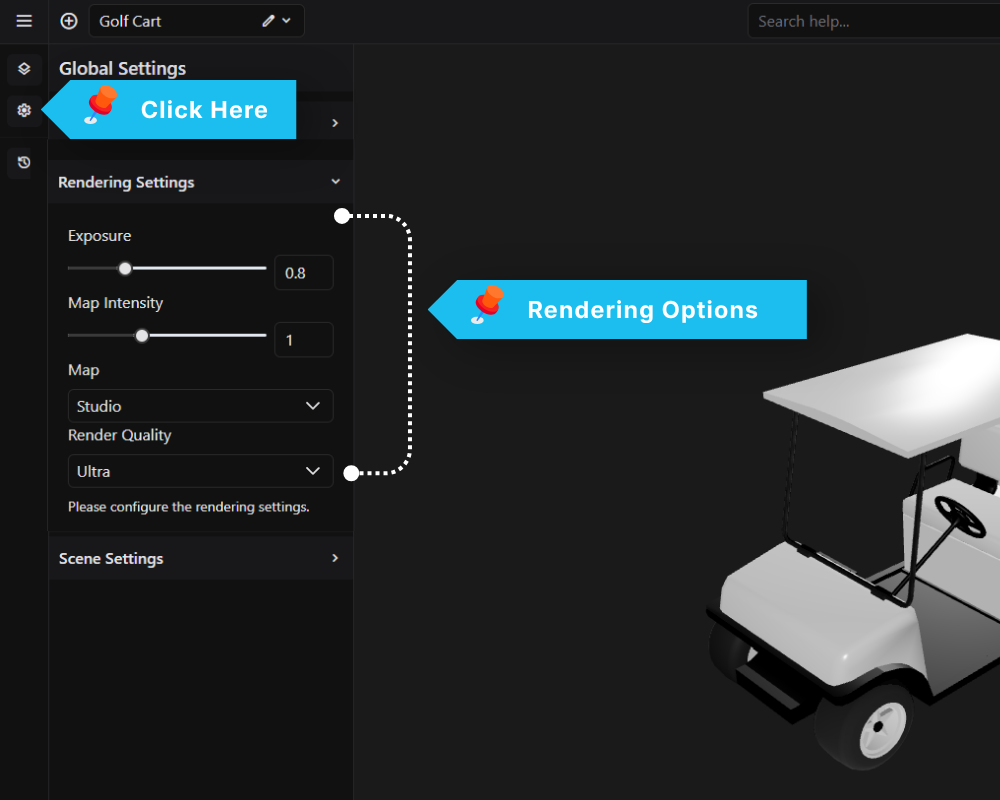
The Rendering Settings panel controls how the 3D scene is tone-mapped and lit by the environment map.
Exposure
Controls the overall brightness of the rendered scene. Lower values produce a darker image; higher values brighten it. Default is 0.8.
Map Intensity
Sets how strongly the environment map contributes to lighting and reflections on materials. A value of 1 applies the map at full strength. Reducing it softens reflections without changing the map itself.
Map
Selects the HDR environment map used for image-based lighting (IBL). The chosen map affects the tone of reflections across all materials in the scene. Available presets include Studio and others depending on your configuration.
Render Quality
Sets how sharp the model looks on the live page, especially glass, resin and other see-through materials, and textures seen at an angle. Choose Standard for the lightest load on the visitor’s device, High for sharper results (the default), or Ultra for the sharpest. Higher settings use more of the visitor’s graphics power, so on slower devices use High or Standard. The frontend shows the model in a smaller area than the editor, so it can look slightly softer than the editor even on Ultra. This setting only affects the live page, not the editor preview.