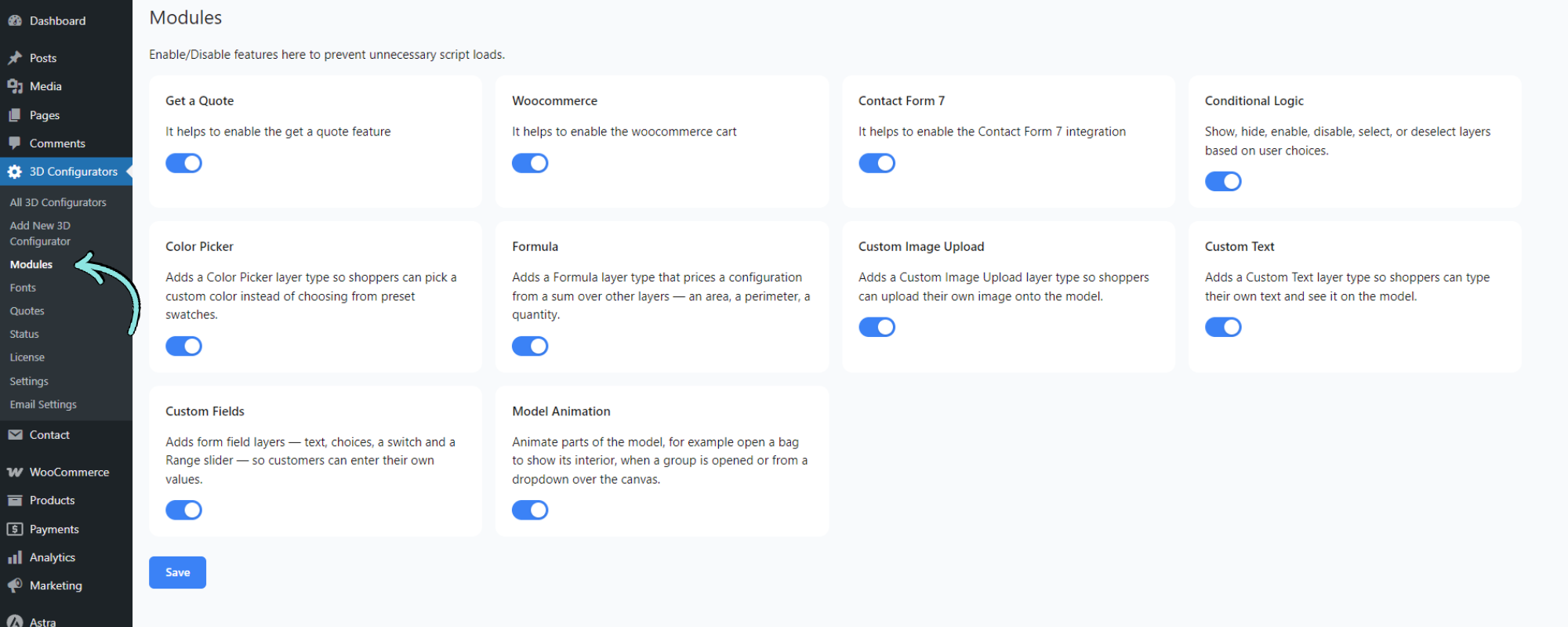
Modules let you enable only the features you need. Unused modules are completely disabled – their scripts, hooks, and filters are not loaded – keeping your site lean and performant.
To manage them, go to 3D Configurators → Modules in your WordPress dashboard. Each module has its own toggle; switch it on or off, then click Save.
Available modules
WooCommerce
Enables WooCommerce cart integration. Required if you want customers to add configured products to the cart. See: WooCommerce Integration.
Get a Quote
Enables the quote request form and email system. Use this if you do not sell directly through WooCommerce but want customers to submit enquiries. See: Get a Quote.
Contact Form 7
Enables integration with the Contact Form 7 plugin. Use it to connect Contact Form 7 forms with the configurator for quote requests, inquiry forms, and custom submission workflows. See: Contact Form 7 Integration.
Conditional Logic
Show, hide, enable, disable, select, or deselect layers based on user choices. See: Conditional Logic.
Color Picker
Adds a Color Picker layer type so shoppers can pick a custom color instead of choosing from preset swatches. See: Color Picker.
Formula – Dynamic Pricing
Adds a Formula layer type that prices a configuration from a sum over other layers – an area, a perimeter, a quantity. See: Formula – Dynamic Pricing.
Custom Image Upload
Adds a Custom Image Upload layer type so shoppers can upload their own image onto the model. See: Custom Image Upload.
Custom Text
Adds a Custom Text layer type so shoppers can type their own text and see it on the model. See: Custom Text.
Custom Fields
Adds form field layers – text, choices, a switch, and a Range slider – so customers can enter their own values. See: Custom Input Field.
Model Animation
Animate parts of the model, for example open a bag to show its interior, when a group is opened or from a dropdown over the canvas. See: Model Animation.
Notes
- Enable or disable modules at any time without losing your configuration data.
- Click Save after changing any toggle; changes are not applied until you do.
- Several layer types (Color Picker, Formula, Custom Image Upload, Custom Text, Custom Fields) only appear in the layer editor while their module is enabled.