
An Option layer defines a single selectable choice within a Group or Sub Group.
To create an Option layer:
- Click the + button inside a Group, or press O.
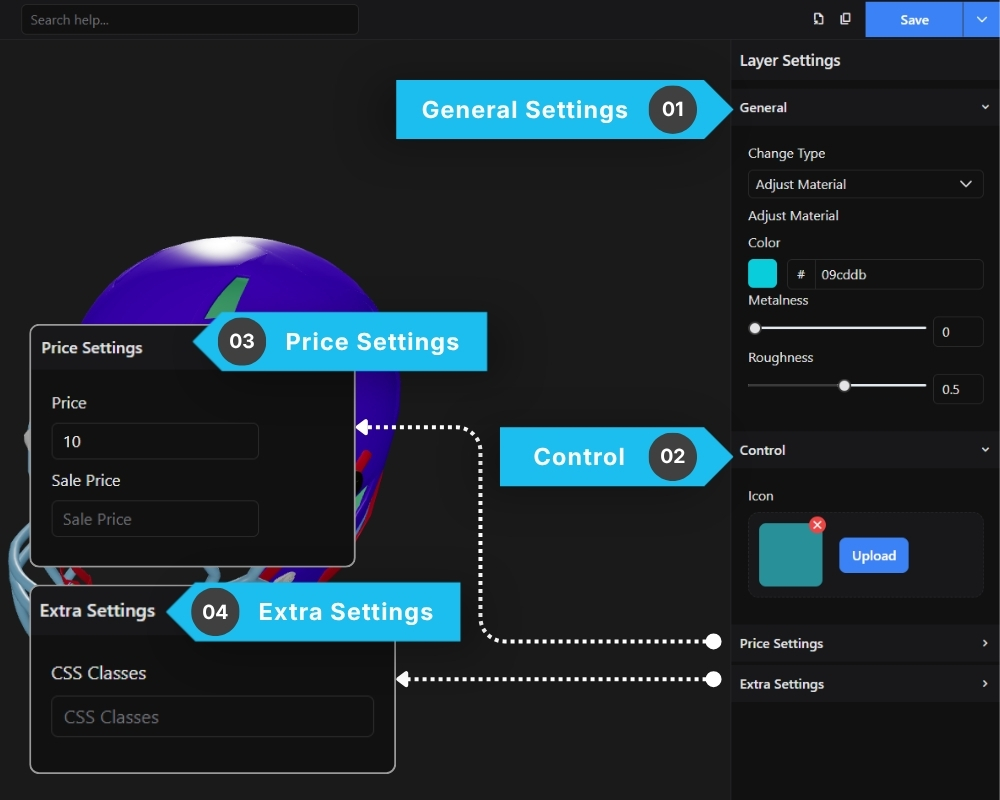
1. General Settings
The General Settings section controls the primary behavior and visual functionality of the selected option layer.
Depending on the selected action type, different settings may appear here.
2. Control
The Control section manages how the option appears inside the configurator interface.
This helps improve the customer experience by making options visually recognizable.
3. Price Settings
The Price Settings section allows you to assign additional costs to specific options.
This is useful when certain upgrades or materials increase the product price.
4. Extra Settings
The Extra Settings section provides advanced customization controls for developers and advanced users.
CSS Classes
Allows you to assign custom CSS classes to the layer.
This can be used for:
- Custom styling
- JavaScript targeting
- UI customization
- Advanced frontend behavior