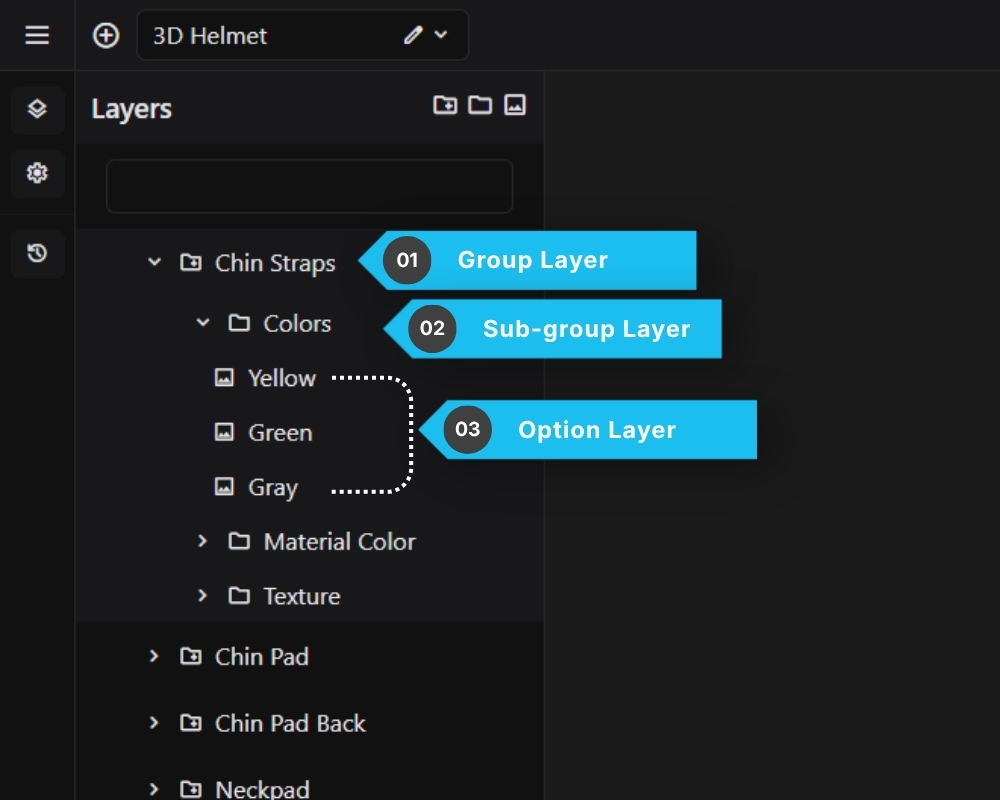
Options in the configurator are organized in a three-level hierarchy:
Group
└── Sub Group (optional)
└── Option
1. Group
The top-level category. For example: “Color”, “Material”, “Finish”. A Group is directly linked to one or more meshes in your 3D model.
2. Sub Group
An optional middle level for organizing options within a Group. Useful when a Group has many options or needs further categorization.
3. Option
The individual selectable choice the customer sees. For example: “Red”, “Matte Black”, “Brushed Steel”. Each Option defines what happens to the 3D model when the customer selects it.
Layers are displayed in the Layers panel on the left side of the editor. You can drag and drop layers to reorder them.