
When building product configurations, there are cases where customers must make a selection before completing their customization. This is especially common for important product attributes such as colors, materials, finishes, or required components. WP 3D Configurator provides two useful features for handling these scenarios: Required Groups and Multiple Mesh Selection.
Required Groups
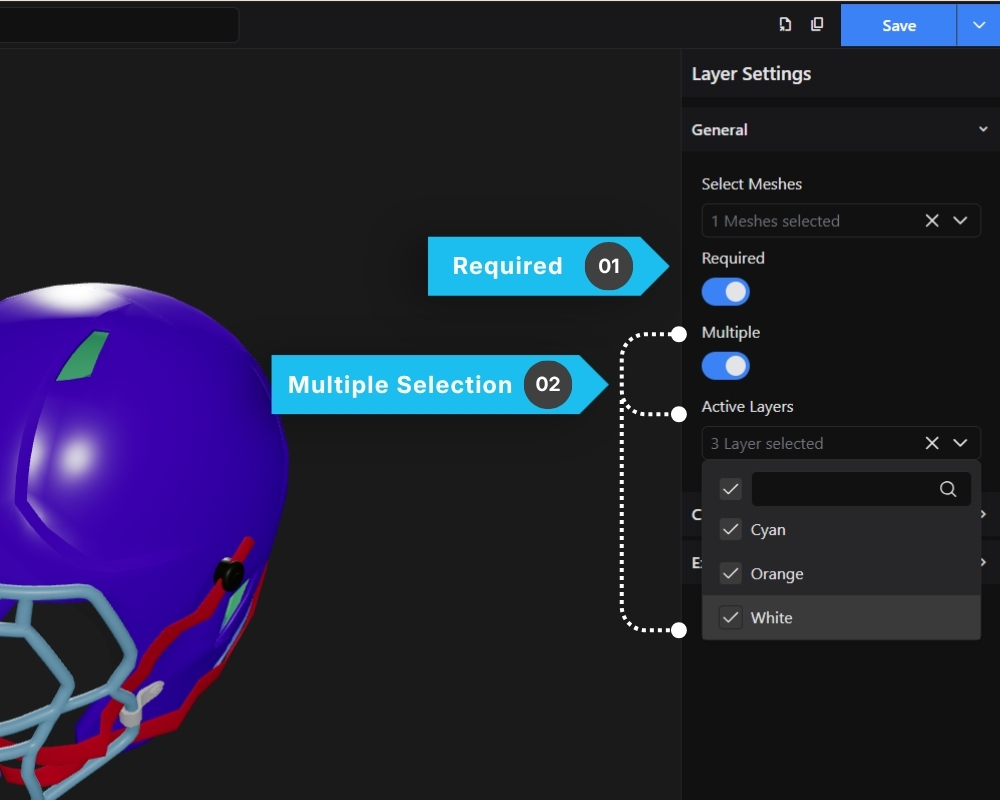
The Required option ensures that customers must select at least one option from a group before proceeding with their product configuration.
This feature is useful for essential customization sections where a selection should never be skipped.
Common Use Cases
- Product Color
- Material Selection
- Size Selection
- Required Accessories
- Mandatory Components
For example, if you are configuring a football helmet, the customer should always select a chin strap color before finalizing the product. By enabling the Required setting on the group layer, the configurator ensures that at least one option inside that group remains active.
How to Enable Required
- Select the parent Group Layer
- Open the Layer Settings
- Locate the Required toggle
- Enable the setting
Once enabled, users will be required to keep at least one option selected from that group.
Example
In the helmet demo:
- Group Layer:
Chin Straps - Options:
- Yellow
- Green
- Gray
By enabling Required, the customer cannot leave the chin strap configuration empty. One of the available options must remain selected.
Multiple Mesh Selection
The Multiple setting allows a group layer to activate multiple option layers at the same time instead of limiting the selection to only one option.
This feature is useful when customers should be able to combine multiple options within the same group during product customization.